Informational Literacy Tech Play

The topic of Information Literacy concerning an Educational Technology course may misinterpret its relevance and application to technology. The digital age consumes all aspects of our lives, making it easy to forget how we obtain knowledge. Information literacy is our ability to recognize when information is needed and have the skills to locate, evaluate, and use the data effectively.
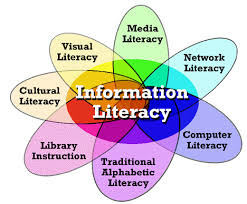

Let us consider some resources to support learning information skills. For a variety of search tools, try OnlineUniversities.com blog, “100 Time-Saving Search Engines for Serious Scholars.” The search engines let you find books, journal articles, and even primary source material for your research projects. The U.S. government website DigitalLiteracy.gov provides students a portal to basic-level digital literacy information. Students can learn the necessary computer and internet skills. Digital literacy fits into the National Forum on Information Literacy (NFIL) under Media Literacy, fulfilling computer literacy in the knowledge and ability to use computers for finding information on the Internet.

Three personal favorites fitting into the (NFIL) Research & Library Skills category are number one, WolframAlpha – you enter what you want to calculate or know about and get a list of resources. Second, Dogpile – a metasearch engine finding information from the web, images, videos, and news feeds. The third, Commonsensemedia.org, provides teachers with relevant reviews and ratings of movies, books, TV shows, apps, and games for appropriate age-related learning content, for incorporation into the classroom.

Another feature of Commonsense focuses on news and media literacy resources and provides the teacher lessons to empower the student to be digital citizens. At this point, let’s discuss Edutopia, another digital citizenship resource using articles, videos, and other resources to inform students about internet safety and cyberbullying. Each of the before mentioned sites offers engaging teachable lessons on copyrights, security, and privacy fulfilling the ethical and moral standards within Information Ethics. 

Last but not least, under the NFIL infographic heading of Critical Literacy, we will place Google Search Education, this site provides lesson plans and interactive training for teachers. The teachers assist their students in using academic sources to help students become critical thinkers leading them on to independent learners. Another source is ProCon.org, quoting their mission statement, ” to promote education, critical thinking, through the presentation of controversial issues in a straightforward, nonpartisan, and primarily pro-con format.” ProCon.org is part of Newseumed.org. The composition of the site is engaging, and provides teachers with lesson plans to follow, inserted with thought-provoking questions for the students.

These are a couple from the numerous list for resources to support learning information literacy skills that I researched. A resource tool does not include every area on the NFIL infographic. Still, teachers can deliver lessons by manipulating the given resources to create a curriculum incorporating each NFIL infographic area.

For the first example, the incorporation of Interactive Notebooks for my students. They allow me to work with students organizing their thinking, teach study skills, and spark student creativity. The notebook accommodates multiple learning styles to develop. The notebook builds a portfolio, and the teacher can track a student’s progress. The journal becomes a resource for extending learning, and the room has less clutter.

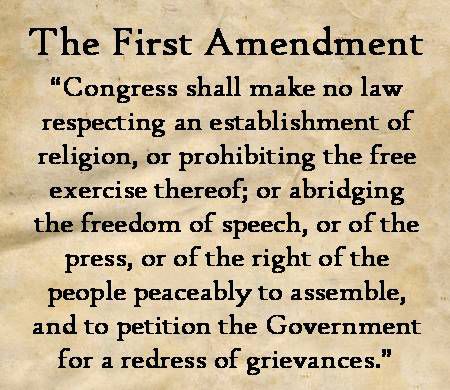
The next example, we will use a current event lesson plan under NewseumED for students to explore their First Amendment knowledge by discussing a current issue or controversy via multimedia

Instructions

I, the teacher would review the First Amendment with the students and place the handout online.
undefined

Distribute the In My Opinion Worksheet

PDF

Explain that the students will research a current First Amendment new story. The story is over an ongoing controversy or a case before the courts.

They will use the medium of choice – op-ed essay, video blog, multimedia poster to discuss their opinion, should rights be protected or not.

The students can break into small groups to share, discuss topics, and design multimedia.

Discussion questions can initiate their critical thinking of the subject:

Why did you think the story was interesting?

Do you think the First Amendment protects the actions? Why or Why not?

How did you weigh the issue against balancing human rights?

Students will share their final products with the class and discuss their processes and conclusion.

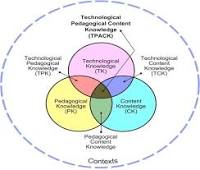
TPACK and Transformation Learning : The learning objectives (C) were for students to research current issues. They had to generate ideas and questions by evaluating the problem. Students used a variety of sources to gather, evaluate, and synthesize data into a multimedia presentation to communicate knowledge. The approach pedagogical (P) presents information following a line of reasoning developing appropriate organization style. The teacher will need to know the First Amendment, current events, where to gather relevant information, and the credibility of the sources. The strategic use of digital media and visual displays of data to express information and enhance understanding of presentations integrate the assignment to the Modification level. The pedagogical approach, through the information gathered by students from multiple prints and digital sources within a variety of technical and data sources, created and communicated knowledge. The learning affordance of eportfolios as a tool supporting students during the integration of their digital media presentation acknowledging their competencies of common core standards and development as critical thinkers. The teacher has the ability for assessment with the eportfolio and sharing the classroom assignment integrating the technology of blogs and eportfolios into the Redefinition level and completes our TPACK work model. 

Creativity Tools – Tech Play 3

Hello Savvy Techs, this week, we are going to discuss creativity tools. As you know, a creativity tool allows students to create or produce something. During creativity tools week, iPad demonstrations of these apps of Book Creator, Educreations, iMovie, ShowMe, and SonicPics, tet me narrow done my favorite tools. Here are my creativity tool reviews:

SonicPics

MyTake ****The SonicPic allows students to make an appropriate choice of selecting images to coincide with selected text. Images can be uploaded online or take pictures for the creation of a project. The student can record their voice to coincide with the photos. Students can practice their fluency, inflection, and reading aloud. An excellent application for the advanced learners and ELL, to have students select images to illustrate a poem and read it out loud. The finished product can be sent via email or Youtube to give an audiovisual project within a shorter time and be a learning tool. (4-star rating)

Educreations

My Take *****Educreations is a tool for creating and sharing multimedia lessons for you and your students. Teachers invite your students to lessons with a link sent via the app or with a code. You can also email experiences, embed them within a blog or website, or share via Facebook, Twitter, or on the Educreations website. Teachers can view and use lessons created by other teachers — on a wide range of subjects — only usable if made public. Teachers could use it for assessment. Upon demonstrating the app’s functionality and instruction, students can apply for class presentations, analyze written work, marking areas, and explaining techniques for practical writing skills. Students can demonstrate how to solve math problems and explain their thinking to other students. 

Book Creator

My Take ****Book Creator is an easy-to-use digital book-making. It’s available for both the iPad and the web (including Chrome). After reading the tutorial, book creation began. The steps were easy to follow, choose a book shape, add photos, and videos. Students will find options for adjusting or deleting. Upon completion, the student is given a code to the class library. The library is accessible by the teacher and classmates. Books are shared by email, Google Drive, Dropbox, printed, and published. One aspect is that Book Creator is perfect for app smashing, too, because anything with a link adds to the book. 

Storytelling and book creation are creative tasks in classrooms and empowers students to create, share their work, using critical-thinking and organization skills as they brainstorm, plan, and make creative decisions. Students can practice their writing skills while teachers have another way to communicate class information or to collect student learning and accomplishments throughout the year as a portfolio tool.

iMovie

My Take ***** iMovie, in my opinion, is the ideal introductory editing tool for Apple classrooms, especially either tablets or Macs. It supports project-based learning and builds students’ digital storytelling skills. The teacher should spend time introducing storyboarding to students. They will be able to organize their ideas and design the video using pen and paper, gather footage and images toward vision creation. The built-in storyboarding tool allows for ease in selecting clips to drop into the timeline. Students will enjoy ready-made themes and templates for an application. Your savvy video producer will become disenchanted with the limited options for title editing, compositing, and layering.

In terms of projects, iMovie satisfies just about any need for demonstrating learning. Students can use iMovie to develop a digital portfolio, including book trailers, to interviews, to collaborative conversations to presentations. Teachers can also record demonstrations and lessons for a flipped classroom or for students who need additional assistance. 

Using iMovie Example One

iMovie can transform the unit review from answering fill in the blank or short answer questions on Google classroom into an end of the unit projects (CK). Students are creating personal movie trailers and podcasts, showing what they have learned in the unit (PK). The creativity tech tool moves the class in modification. The activities working together in small groups and sharing their creations and with the school demonstrates educational affordances of content sensitivity, social interactivity, and connectivity(TCK). iMovie enabled the class to develop strategies in learning with technology(TPK). Students producing multimedia impacted them more than a written assignment and took the task into Redefinition and crossed the diagram into all points of TPACK. 

Using iMovie Example Two

I spoke to another teacher who wanted a different assignment for their

business ethics class (C). The suggestion was for students learning how to behave in a business environment to create a 30 second Public Service Announcement commercial on ethical business standards (PK). The students got in groups of six and used their cell phones to shoot videos, student majority with an iPhone made IMovie the editor of choice. The class creativity was transformed and magnified (TK) with the students’ ability to shoot videos in multiple places. The classroom walls disappeared, and the world of exploration opened. Students filmed the negative behaviors to change at school. While in class editing videos, there was plenty of student collaboration and sharing ideas. Some students mastered the iMovie app and felt comfortable teaching and assisting other groups with editing. The assignment completion accomplished using the app on their phone.

In my opinion, this app is a resource that teachers can utilize in the classroom to promote and develop the 4C’s that are essential skills for students to succeed (TPK). iMovie helped students strengthen their skills with Communication by creating a video that communicates a clear message to the public. The collaboration was high because ideas were mixed and fused by groups through planning scenes and detail before shooting (TCK). There is lots of creativity when using this app, going beyond the classroom walls to limitless creativeness. Lastly, critical thinking had a leading role throughout the project. There were plenty of details and problems that had to be solved, such as absent students. But overall, the students were able to work through adversity and complete the PSA commercial developing and practicing ethical business standards through information gained evaluating practical application – (TPACK reached).

Creativity Tools Enhanced by TPACK

Summary

Creativity tools can enhance course instruction and assessment techniques for students. The students can become efficient and fluid using this learning system by opportunities to use design skills to communicate their understanding of information within their creative forum. Without relying on the teacher as the information provider. There is value in allowing your students to explore different tools; after all, the goal is for them to gain knowledge, and each of us does that differently.

TechPlay 2 Eportfolio Exploration Reflection

This week’s blog post is a reflection of my understanding of “folio thinking.” A blogger’s test of the appropriate tools lead to playtesting Wikis, websites, and proprietary tools, discussed first. Wikis are a website that everyone can edit who has access. The problem I see is that anyone can add, change, and delete the content on the page. There are several pbwiki.com, wetpaint.com, and wikispacers.com, and you can also create wikis in Blackboard – youtube.com/watch?v=i8yQBNfS6kl. Next, websites – some sites are free, others you may pay for hosting. In my real estate business, I have used Superlative, and GoDaddy both have their pros and cons, lower hosting costs but not easy to add content to the website. Google websites offer a classic and new version. Both offer user pros. The ability to create a functional portfolio for the novice can be challenging, so proprietary tools, a vendor sold software, are the solution. On Mashable.com, I found twenty tools demonstrating the best showcase of e-portfolios.

Graduate coursework offers learners a thinking interaction. Eportfolios gives the graduate student a platform to demonstrate their progression of educational technology learning by reflecting on in-depth questions of the professor. This format of learning instructs us how to teach the students we have to be open thinkers and apply knowledge. A student ‘s ability for practical application of their course work as opposed to a multiple-choice question answering is what e-portfolios design enhances.

My learning preference and what is relevant in this field are a built-in relationship formulating coursework simulating discussion and taking thought-provoking answers to think out of the box.

We can identify the technological affordance’s physical and electronic portfolios through how they created. A physical collection would be suitable for an artist, architect, or designer if a visual display asks for it. What if they submit a digital display of their work? Let’s render the artist brush strokes to examine technique or make a 3D model of the architect’s bridge design.

What tools would my students use in the classroom? The idea of students reflecting on learning, thinking through the process to become aware of their learning potential is exciting. Indeed eportfolios would be the pinnacle, but other tools like Wikis to incorporate collaborative group project learning. G Suite for Education is another collaborative tool, and it includes Google Classroom, integrates with Chrome technology, and no cost for schools. 

Students desire a challenge in the classroom; they do not want to read pages out of a textbook and answer questions at the end of the chapter. How can we use eportfolio tools to enhance instruction? The 7th grade English class is reading “The Giver.” The level is assigned to read each chapter and write a 200 word summary over each section. Add the option that students can listen to the novel through an audiobook – (Substitution) or as the instructor read to your students in an audio file pointing out relevancy – (Augmentation). Ask students questions, ” What genre are we reading? In what person is the story told? What theme is developing? Discuss the rising action, the conflict, and the resolution?” Have your students incorporate their answers into their eportfolios – (Modification) and ask them how or can they relate to the events in the story into today’s society. Still working in their eportfolios, groups of students will work together to change the ending of the story and develop a virtual storyboard on how their group’s conclusion would change the theme of the novel – (Redefinition). Viewing this lesson through the TPACK model as a teacher, we need to have content knowledge of applying “The Giver” to the English Teks to be taught. Pedagogical knowledge (PK) – how do the students learn best, individual reading, popcorn reading, or audio reading. Using the digital tools available to me like eportfolios will be the vehicle to the learning outcomes.

Technology Blog

“Hold fast to dreams

For if dreams die

Life is a broken-winged bird

That cannot fly.”

– Langston Hughes

Be yourself; Everyone else is already taken.

— Oscar Wilde.

Welcome to Tech Taught Savvy. You will find additional blogs to read. Please submit comments, let me know your thoughts. I’m just getting this tech blog going, so stay tuned for more. Subscribe below to get notified when I post new updates.

Introduce Yourself (Example Post)

This is an example post, originally published as part of Blogging University. Enroll in one of our ten programs, and start your blog right.

You’re going to publish a post today. Don’t worry about how your blog looks. Don’t worry if you haven’t given it a name yet, or you’re feeling overwhelmed. Just click the “New Post” button, and tell us why you’re here.

Why do this?

  • Because it gives new readers context. What are you about? Why should they read your blog?
  • Because it will help you focus you own ideas about your blog and what you’d like to do with it.

The post can be short or long, a personal intro to your life or a bloggy mission statement, a manifesto for the future or a simple outline of your the types of things you hope to publish.

To help you get started, here are a few questions:

  • Why are you blogging publicly, rather than keeping a personal journal?
  • What topics do you think you’ll write about?
  • Who would you love to connect with via your blog?
  • If you blog successfully throughout the next year, what would you hope to have accomplished?

You’re not locked into any of this; one of the wonderful things about blogs is how they constantly evolve as we learn, grow, and interact with one another — but it’s good to know where and why you started, and articulating your goals may just give you a few other post ideas.

Can’t think how to get started? Just write the first thing that pops into your head. Anne Lamott, author of a book on writing we love, says that you need to give yourself permission to write a “crappy first draft”. Anne makes a great point — just start writing, and worry about editing it later.

When you’re ready to publish, give your post three to five tags that describe your blog’s focus — writing, photography, fiction, parenting, food, cars, movies, sports, whatever. These tags will help others who care about your topics find you in the Reader. Make sure one of the tags is “zerotohero,” so other new bloggers can find you, too.