
The topic of Information Literacy concerning an Educational Technology course may misinterpret its relevance and application to technology. The digital age consumes all aspects of our lives, making it easy to forget how we obtain knowledge. Information literacy is our ability to recognize when information is needed and have the skills to locate, evaluate, and use the data effectively.
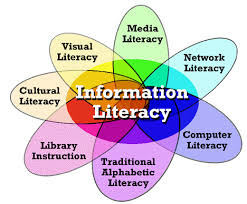
Let us consider some resources to support learning information skills. For a variety of search tools, try OnlineUniversities.com blog, “100 Time-Saving Search Engines for Serious Scholars.” The search engines let you find books, journal articles, and even primary source material for your research projects. The U.S. government website DigitalLiteracy.gov provides students a portal to basic-level digital literacy information. Students can learn the necessary computer and internet skills. Digital literacy fits into the National Forum on Information Literacy (NFIL) under Media Literacy, fulfilling computer literacy in the knowledge and ability to use computers for finding information on the Internet.
Three personal favorites fitting into the (NFIL) Research & Library Skills category are number one, WolframAlpha – you enter what you want to calculate or know about and get a list of resources. Second, Dogpile – a metasearch engine finding information from the web, images, videos, and news feeds. The third, Commonsensemedia.org, provides teachers with relevant reviews and ratings of movies, books, TV shows, apps, and games for appropriate age-related learning content, for incorporation into the classroom.
Another feature of Commonsense focuses on news and media literacy resources and provides the teacher lessons to empower the student to be digital citizens. At this point, let’s discuss Edutopia, another digital citizenship resource using articles, videos, and other resources to inform students about internet safety and cyberbullying. Each of the before mentioned sites offers engaging teachable lessons on copyrights, security, and privacy fulfilling the ethical and moral standards within Information Ethics.
Last but not least, under the NFIL infographic heading of Critical Literacy, we will place Google Search Education, this site provides lesson plans and interactive training for teachers. The teachers assist their students in using academic sources to help students become critical thinkers leading them on to independent learners. Another source is ProCon.org, quoting their mission statement, ” to promote education, critical thinking, through the presentation of controversial issues in a straightforward, nonpartisan, and primarily pro-con format.” ProCon.org is part of Newseumed.org. The composition of the site is engaging, and provides teachers with lesson plans to follow, inserted with thought-provoking questions for the students.
These are a couple from the numerous list for resources to support learning information literacy skills that I researched. A resource tool does not include every area on the NFIL infographic. Still, teachers can deliver lessons by manipulating the given resources to create a curriculum incorporating each NFIL infographic area.
For the first example, the incorporation of Interactive Notebooks for my students. They allow me to work with students organizing their thinking, teach study skills, and spark student creativity. The notebook accommodates multiple learning styles to develop. The notebook builds a portfolio, and the teacher can track a student’s progress. The journal becomes a resource for extending learning, and the room has less clutter.
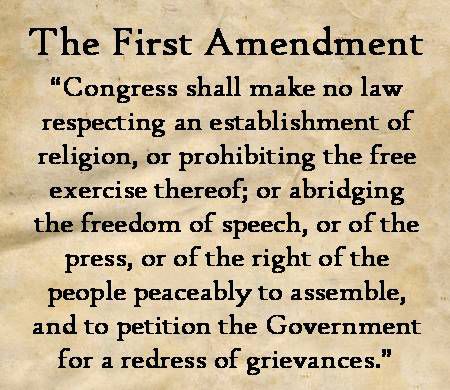
The next example, we will use a current event lesson plan under NewseumED for students to explore their First Amendment knowledge by discussing a current issue or controversy via multimedia
Instructions
I, the teacher would review the First Amendment with the students and place the handout online.
Distribute the In My Opinion Worksheet
Explain that the students will research a current First Amendment new story. The story is over an ongoing controversy or a case before the courts.
They will use the medium of choice – op-ed essay, video blog, multimedia poster to discuss their opinion, should rights be protected or not.
The students can break into small groups to share, discuss topics, and design multimedia.
Discussion questions can initiate their critical thinking of the subject:
Why did you think the story was interesting?
Do you think the First Amendment protects the actions? Why or Why not?
How did you weigh the issue against balancing human rights?
Students will share their final products with the class and discuss their processes and conclusion.
TPACK and Transformation Learning : The learning objectives (C) were for students to research current issues. They had to generate ideas and questions by evaluating the problem. Students used a variety of sources to gather, evaluate, and synthesize data into a multimedia presentation to communicate knowledge. The approach pedagogical (P) presents information following a line of reasoning developing appropriate organization style. The teacher will need to know the First Amendment, current events, where to gather relevant information, and the credibility of the sources. The strategic use of digital media and visual displays of data to express information and enhance understanding of presentations integrate the assignment to the Modification level. The pedagogical approach, through the information gathered by students from multiple prints and digital sources within a variety of technical and data sources, created and communicated knowledge. The learning affordance of eportfolios as a tool supporting students during the integration of their digital media presentation acknowledging their competencies of common core standards and development as critical thinkers. The teacher has the ability for assessment with the eportfolio and sharing the classroom assignment integrating the technology of blogs and eportfolios into the Redefinition level and completes our TPACK work model.

 Educational Technology